The GitHub way
Step 1. Download FEDOT Framework.
First of all, you need to clone the FEDOT Framework to your personal computer. You can do it directly using the button Code (red square) and then copying a link to the repository (blue square).
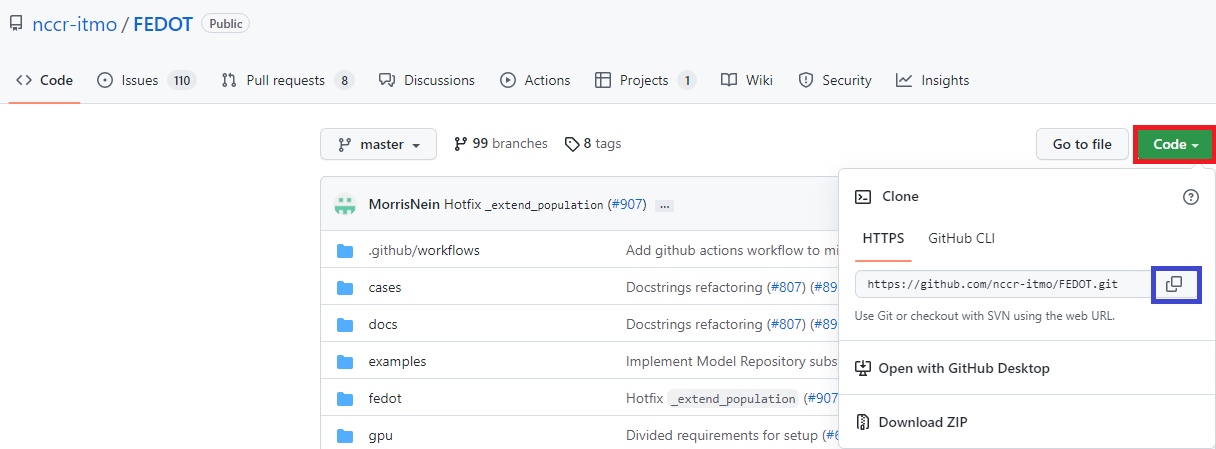
Then open cmd (Windows) or terminal (Unix-like OS), type in:
$ git clone https://github.com/aimclub/FEDOT.git
$ cd FEDOT
Step 2. Creating VirtualEnv.
Next, you need to create a virtual environment in your project to avoid libraries incompatibility. To do this, type in
$ python -m venv <your_venv_path>
Then, activate venv by using the following command on Unix-like OS
$ source venv/bin/activate
# remember to call `deactivate` once you're done using the application
or the following command using Windows OS
$ venv\Scripts\activate
# remember to call `venv\Scripts\deactivate` once you're done using the application
After creating the virtual environment, install the libraries necessary for FEDOT to work. Type in:
$ pip install .
But, if you want to use additional functionality such as NNs, you’ll need to run full installation option.
To do this run the following command
$ pip install .[extra]
- You can make use of the last command even after the previous one:
In that case only new packages will be installed, others will be skipped.